Cartwright: Checkout Rules
Payment and checkout rules you can read.
Checkout rules for small Shopify stores, written as sentences instead of code.
Open the App Store listingCartwright is installed from the Shopify App Store. Once it is installed, open it from the Apps section of your Shopify admin.


What Cartwright does
- Payment methods. Hide the methods a buyer sees at checkout. Shopify does not apply customizations to credit-card payment methods on stores in the United States and Canada unless the store is on Shopify Plus.
- Checkout requirements. Stop a checkout that does not meet your rule, and say why in your own words.
- Conditions you can read. A rule can depend on the order total, the number of items, the country or region, and the delivery option chosen.
The product
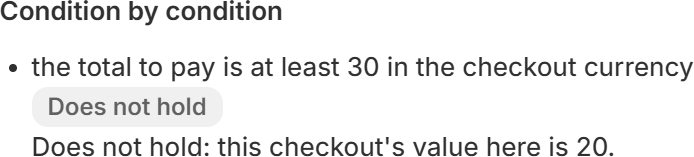
See why a rule did not match.

Live or paused, one switch.


Twelve starters, added paused.


Fail-safe
If a rule ever fails, your checkout keeps working.
Price
Free to install: write your rules and test them against checkouts you describe without paying anything.
During your 7 day trial you can put rules live without choosing a plan. After it ends, you need a paid plan to put new rules or changes live at your checkout. Plans cost $9.99, $19.99 or $39.99 a month, priced for the size of your store.
Every plan has the same features and the same support. There are no rule caps, no order caps, and no extra fee when you get more orders.
No plan of ours caps how many rules you write. What limits how many you can have live, once you are on a plan, is how much of the checkout's capacity your rules need. Your payment rules and your checkout requirements each get a budget for the room they take and for the work they do, and which one you meet first depends on the rules you write. We check yours as you save, and where we can see that a set would not run we stop the save and tell you, rather than letting your rules quietly stop applying.
Install
Open the App Store listingQuestions before you install? Email support@getcartwright.com.